Ontology vs semantic model: the difference is easier to explain with a running watch than with a textbook. Two simple questions are enough.
“How fast did I run on average?” sounds like a question with exactly one answer. Say I run 5 km at a pace of 5:00 min/km on Tuesday and 20 km at 6:00 min/km on Sunday. The average of the two paces is 5:30. For all 25 km together, though, I needed 145 minutes, which is 5:48 per kilometer. Both numbers are mathematically valid, but they answer different questions: the average pace per activity, or the pace across the whole distance. For my pace across all 25 km, 5:48 per kilometer is the correct answer.
The second question is: “How many half marathons have I run?” If you count every run of 21.1 km or more, you also catch long training runs, such as my 21.6 km on September 9, 2024. If you search for “half marathon” in the activity title, you miss my race in 2024, which Strava simply calls “Lauf am Morgen”. What I actually mean is an official race over 21.0975 km.
People make these mistakes, and an LLM that writes SQL from a question makes them too. The two questions stand for two different problems. With pace, the question has to be pinned down once, and then the right calculation follows. Writing down that calculation so that it is used the same way every time is the job of a semantic model. With the half marathon, it is not even clear what the word means. That is the job of an ontology.
This article explains both terms. After that, I build an example from my running data in DuckDB with Apache Ossie files and test whether it actually helps an LLM. A short look at knowledge graphs closes the article. All code runs in a notebook.
Ontology: what a word means
An ontology describes the terms of a domain and how they relate to each other, including the rules that always apply. Tables and columns do not appear in it – it’s tool neutral.
An ontology starts with terms: run, training, race, half marathon. Between the terms there are relationships. The most important one is “is a”: a half marathon is a race, and a race is a run. Domain relationships such as “a run has a distance” come on top. Rules complete the picture, for example that a long run is a training run of at least 18 km.
Two related terms are often mixed up with it. A glossary explains each term on its own, and a taxonomy arranges terms in a tree of “is a” relationships. An ontology allows any relationship and any rule, and writes them down formally enough for a machine to draw conclusions.
An example shows what drawing conclusions means. Every half marathon is a race, and my run in Ulm in 2025 was a half marathon. So it was also a race, even though that fact is stored nowhere. An AI agent that knows the ontology counts the half marathon when asked “How many races?” and counts no long run when asked “How many half marathons?”
What an ontology does not tell you: which table holds the runs and how to calculate a pace from them. That is the job of the semantic model.
Semantic model: how to calculate correctly
A semantic model translates business terms into SQL and defines every metric exactly once. In Ossie it has four building blocks:
- Datasets are the tables the model talks about, each with a primary key. In my case, these include the tables runs and run_types.
- Fields describe what you can group or filter by, such as year or run type.
- Relationships define how the tables belong together, in other words the joins. Every run has exactly one run type.
- Metrics are aggregated measures. Pace is the sum of all times divided by the sum of all distances, not the average of the individual paces.
Whoever asks a question only names a metric, a dimension and a filter, for example “pace by year, half marathons only”. The model turns that into SQL with the right joins and the right grouping. An AI agent no longer has to guess the pace formula, it picks from a list of defined metrics.
The idea is not new. SAP BusinessObjects called it a universe, Power BI calls it a semantic model, Looker keeps it in LookML and dbt in its Semantic Layer. Every vendor has its own format. This is where Apache Ossie comes in: an open YAML format that every tool should be able to read and write. Snowflake announced the initiative together with other vendors in September 2025 as Open Semantic Interchange (OSI). Since July 2026 it has been part of the Apache Incubator as Apache Ossie. Many vendors like Databricks or Microsoft joined.
Ontology vs semantic model at a glance
The ontology defines what a word means. The semantic model defines how to calculate it from tables.
This is a split of responsibilities, not of two separate worlds. In this article, I use ontology for domain concepts and their relationships, and semantic model for the analytical definitions bound to data. In practice the two overlap: my semantic model also lists run types and synonyms, and my ontology contains a classification rule that compares the run type with “Half marathon”.
| Ontology | Semantic model | |
|---|---|---|
| Answers | What does a term mean? | How do I calculate a metric? |
| Refers to | the domain, independent of data | specific tables and columns |
| Building blocks | terms, “is a”, relationships, rules | datasets, fields, joins, metrics |
| Example | A half marathon is a race over 21.0975 km. | Pace = SUM(time_sec) / (SUM(distance_m) / 1000.0) |
| Delivers | shared vocabulary and conclusions | correct numbers via SQL |
| Classic formats | OWL, RDF, SKOS | dbt Semantic Layer, Power BI |
| In Apache Ossie | ontology specification | core specification |
| Changes | when domain definitions change | when analytical definitions or source mappings change |
Both work together, and the link between them is called a mapping. It says, for example: the term half marathon corresponds to the runs whose type in the table run_types is “Half marathon”. Ossie has its own document format for this. Next to the ontology and the semantic model, a project therefore has a third file for the mapping.
Hands-on, part 1: data, ontology and mapping
The example consists of a DuckDB database and three YAML files in Apache Ossie format. All three files pass the official validator of the Ossie project. Every snippet below is also in the Colab notebook, where you can run it step by step.
The data
The data are my real runs from Strava for the years 2021 to 2025, 883 in total. From the export I kept only date, GPS distance and moving time. Strava has no field for the type of run, so whether a run was a race exists only in my head and, sometimes, in its name. The same is true with many data points in the enterprise …
The data script therefore assigns the type. The five half marathons in Ulm are known by their date and get the official net time instead of the watch time. A run of 18 km or more counts as a long run, everything else as an easy run:
-- My runs 2021 to 2025 from Strava: date, GPS distance and moving time per run
CREATE OR REPLACE TABLE run_types (
    run_type_id INTEGER PRIMARY KEY,
    run_type    VARCHAR NOT NULL,
    category    VARCHAR NOT NULL        -- Training or Race
);
INSERT INTO run_types VALUES
    (1, 'Easy run',      'Training'),
    (2, 'Long run',      'Training'),
    (3, 'Half marathon', 'Race');

CREATE OR REPLACE TABLE runs (
    run_id      INTEGER PRIMARY KEY,
    run_date    DATE    NOT NULL,
    run_type_id INTEGER NOT NULL REFERENCES run_types,
    distance_m  INTEGER NOT NULL,       -- measured by GPS
    time_sec    INTEGER NOT NULL        -- moving time, official net time for races
);

-- Strava has no field for the type of run. Races are known by date, with their official net time.
INSERT INTO runs
WITH half_marathons (run_date, official_sec) AS (
    VALUES (DATE '2021-10-03', 6576), (DATE '2022-09-25', 6554), (DATE '2023-10-01', 6322),
           (DATE '2024-09-29', 6458), (DATE '2025-09-28', 6700)
)
SELECT s.run_id, s.run_date,
       CASE WHEN h.run_date IS NOT NULL THEN 3
            WHEN s.distance_m >= 18000  THEN 2
            ELSE 1 END,
       s.distance_m,
       coalesce(h.official_sec, s.time_sec)
FROM read_csv('runs.csv') s
LEFT JOIN half_marathons h ON h.run_date = s.run_date AND s.distance_m > 20000   -- the race, not a warm-up
ORDER BY s.run_id;
The classification is therefore supplied by me. An LLM does not have to discover which activities were races, it has to translate a question into the categories stored in the database. That is the part the test at the end checks.
The ontology
The ontology knows nothing about tables. It describes what a run is and which kinds of runs exist, together with their rules. Here is the most important part:
version: 0.2.0.dev0
name: Running
prefixes:
  run: https://buckenhofer.com/ontology/running#
ontology:
  - concept: Kilometers
    type: ValueType
    extends: [Decimal]
    requires: ["Kilometers > 0"]

  - concept: Run
    type: EntityType
    iri: run:Run
    identify_by: [nr]
    relationships:
      - name: nr
        roles: [concept: Integer]
        multiplicity: OneToOne
        verbalizes: ["{Run} has number {Integer}"]
      - name: distance
        roles: [concept: Kilometers]
        multiplicity: ManyToOne
        verbalizes: ["{Run} is {Kilometers} long"]
      - name: type
        roles: [concept: String]
        multiplicity: ManyToOne
        verbalizes: ["{Run} is of type {String}"]
      # date and duration work the same way

  - concept: Training
    type: EntityType
    extends: [Run]

  - concept: Race
    type: EntityType
    extends: [Run]
    description: Official race with bib number and timing

  - concept: LongRun
    type: EntityType
    extends: [Training]
    derived_by: ["Run.type == 'Long run'"]
    requires: ["Run.distance >= 18"]

  - concept: HalfMarathon
    type: EntityType
    extends: [Race]
    description: Race over the official distance of 21.0975 km.
      The GPS watch usually measures a bit more.
    derived_by: ["Run.type == 'Half marathon'"]
    iri: run:HalfMarathon
  # EasyRun works like LongRun
Six keywords carry the whole file:
- concept with type creates a term. An EntityType is a thing with its own identity, such as a run. A ValueType is a value with meaning: kilometers are a decimal number greater than zero.
- extends is the “is a” relationship. A half marathon is a race and therefore also a run.
- relationships describe domain relationships. Their verbalizes entry adds the sentence in plain language that a human or a language model can read.
- derived_by is a rule for who belongs to a term. A run of type “Long run” is a long run.
- requires is a rule that must always hold. A long run has at least 18 km.
- iri gives the term a globally unique name. This is how the ontology connects to RDF, more on that below.
[embed: node/1d6353f3-3e4c]
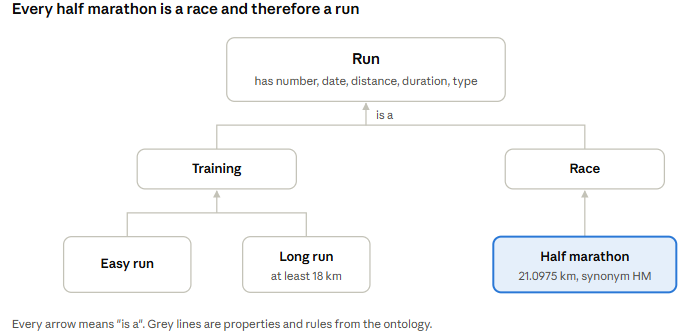
As a picture, the ontology is a small tree. Everything that holds for “Run” also holds for every term below it.
One trap I ran into: I first called the date relationship “on”. YAML reads an unquoted on as the boolean true, and the validator rejected the file. Now it is called date.
The mapping
The mapping connects the terms with the fields of the semantic model from part 2:
version: 0.2.0.dev0
name: running_mapping
ontology_ref: {name: Running, iri: ./running.ontology.yaml}
semantic_model_ref: {name: running, iri: ./running.semantic_model.yaml}
concept_mappings:
  - concept: Run
    object_mappings:
      - expression: runs.run_id
    link_mappings:
      - object_mapping: {expression: runs.run_id}
        children:
          - relationship: date
            object_mapping: {concept: Date, expression: runs.run_date}
          - relationship: distance
            object_mapping: {concept: Kilometers, expression: runs.distance_m / 1000.0}
          - relationship: duration
            object_mapping: {concept: Minutes, expression: runs.time_sec / 60.0}
          - relationship: type
            object_mapping: {concept: String, expression: run_types.run_type}
Two lines show what a mapping is good for. The ontology talks about kilometers, the database stores meters, so the mapping divides distance_m by 1000. And the type of a run is not even in the table runs but in run_types. The ontology does not care, for it the type is simply a property of the run.
I checked all three files with the validator from the Ossie repository. Among other things, it verifies that every term and every field the mapping points to actually exists:
git clone --depth 1 https://github.com/apache/ossie.git
pip install -U jsonschema pyyaml "sqlglot>=30" referencing
python ossie/validation/validate.py --schema ossie/ontology/mapping.json running.mapping.yaml
# Validation PASSED: running.mapping.yaml
For comparison: the same terms in Turtle and SKOS
The classic home of ontologies is RDF, a W3C standard. For simple concept schemes it offers SKOS with a handful of building blocks, for example prefLabel for the name, altLabel for synonyms and broader for the parent term. In Turtle notation the half marathon looks like this:
@prefix skos:  .
@prefix run:   .

run:Race a skos:Concept ;
    skos:prefLabel "Race"@en ;
    skos:broader run:Run .

run:HalfMarathon a skos:Concept ;
    skos:prefLabel "Half marathon"@en ;
    skos:altLabel "HM"@en, "half"@en ;
    skos:definition "Race over the official distance of 21.0975 km"@en ;
    skos:broader run:Race .
The IRIs are the same as in the iri field of the Ossie ontology, which links both worlds.
Hands-on, part 2: the semantic model with Ossie and DuckDB
The semantic model is the file that does the work at query time. The DuckDB extension ossie reads it, generates SQL from it and lets DuckDB run that SQL. Here are the most important parts:
version: 0.2.0.dev0
name: running
ai_context:
  instructions: >
    Always filter half marathons and other races via run_types,
    never by distance. A long training run can be longer than 21 km.

datasets:
  - name: runs
    source: running.main.runs
    primary_key: [run_id]
    fields:
      - name: year
        datatype: Integer
        dimension: {is_time: true}
        expression: {dialects: [{dialect: OSSIE_SQL_2026, expression: YEAR(run_date)}]}
      - name: distance_m
        description: Distance measured by GPS in meters
        expression: {dialects: [{dialect: OSSIE_SQL_2026, expression: distance_m}]}
      # run_id, run_date, run_type_id, time_sec work the same way

  - name: run_types
    source: running.main.run_types
    primary_key: [run_type_id]
    fields:
      - name: run_type
        description: Easy run, Long run or Half marathon
        ai_context: {synonyms: [type of run, HM, half]}
        expression: {dialects: [{dialect: OSSIE_SQL_2026, expression: run_type}]}
      # run_type_id, category work the same way

relationships:
  - name: run_has_type
    from: runs
    to: run_types
    from_columns: [run_type_id]
    to_columns: [run_type_id]

metrics:
  - name: pace_sec_per_km
    description: Seconds per kilometer, total time divided by total distance
    ai_context: {synonyms: [pace, average pace]}
    expression:
      dialects:
        - dialect: OSSIE_SQL_2026
          expression: SUM(runs.time_sec) / (SUM(runs.distance_m) / 1000.0)
  # run_count, distance_km, best_time_sec work the same way
OSSIE_SQL_2026 is Ossie’s expression language, a portable SQL core that should return the same result on every engine. The field year does not exist as a column. The model calculates it with YEAR(run_date) and marks it as a time dimension, so whoever asks for runs by year does not need to know that.
Load and ask
The extension is called ossie and comes from the DuckDB community repository. It is an independent implementation, not an official product of the Apache Software Foundation. The database must be called running, because the model addresses its tables as running.main.runs:
-- duckdb running.duckdb
INSTALL ossie FROM community;
LOAD ossie;
CALL ossie_load('running.semantic_model.yaml');

SELECT name, description FROM ossie_metrics();
Queries go through the table function ossie_query. It takes three lists: metrics, dimensions and filters. The model takes care of the rest.
Question 1: How fast did I run on average?
SELECT to_seconds(round(pace_sec_per_km)) AS pace
FROM ossie_query(['pace_sec_per_km']);
-- 00:05:56

-- for comparison, the naive average over all runs
SELECT to_seconds(round(avg(time_sec / (distance_m / 1000.0)))) AS pace_wrong
FROM runs;
-- 00:05:57
On my real runs, the naive average is only one second per kilometer too slow, because my runs are similar in length and pace. With a mix of short fast runs and long slow ones, as in the example from the introduction, the gap grows. In both cases the model decides the formula, not the person asking.
Question 2: How many half marathons have I run?
SELECT count(*) FROM runs WHERE distance_m >= 21097.5;
-- 6

SELECT * FROM ossie_query(['run_count'], [], ['run_types.run_type = ''Half marathon''']);
-- 5
The sixth run is my long training run of 21.6 km on September 9, 2024. To be honest: Ossie does not know what a half marathon is either. Whoever asks picks the right filter. An AI agent can find the stored value in the field description. The optional ai_context adds synonyms and an instruction not to classify races by distance. The extension does not derive this filter from the ontology.
Question 3: How did my half marathons in Ulm go?
┌───────┬─────────────┬──────────┐
│ year  │ finish_time │   pace   │
├───────┼─────────────┼──────────┤
│  2021 │ 01:49:36    │ 00:05:07 │
│  2022 │ 01:49:14    │ 00:05:00 │
│  2023 │ 01:45:22    │ 00:04:55 │
│  2024 │ 01:47:38    │ 00:04:59 │
│  2025 │ 01:51:40    │ 00:05:15 │
└───────┴─────────────┴──────────┘
The finish times are the official net times. The pace is a bit faster than the official distance would give, because it is based on the GPS distance. The model added the join to run_types and the grouping by year on its own.
What the model makes of it
The function ossie_compile shows the generated SQL without running it. That helps with reviews and with systems where DuckDB is not the engine that executes the query:
SELECT ossie_compile(['pace_sec_per_km'], ['run_types.category'], []);SELECT run_types.category AS "run_types.category",
(sum(runs.time_sec) / (sum(runs.distance_m) / 1000.0)) AS pace_sec_per_km
FROM (running.main.runs AS runs
INNER JOIN running.main.run_types AS run_types
ON ((runs.run_type_id = run_types.run_type_id)))
GROUP BY run_types.categoryI tested all queries using the notebook I published on my GitHub repository.
Does it really help? A test with two LLMs
Whether ontology and semantic model help with that can be measured. The short answer: without documented values, both models I tested failed on my words. The ontology fixed the terms but not the pace calculation, and the metric API fixed the calculation as long as the model could use it.
The setup
The last part of the Colab notebook asks eight questions, including both questions from the introduction in two wordings each. Questions, expected values and the check for each question live in a SQL table. Every question runs under four conditions:
- A, schema only, free SQL: the LLM sees the table schema and writes any SQL.
- B, semantic model, metric API: the LLM sees the semantic model without its ai_context blocks and may read data only through ossie_query. Descriptions, metrics and relationships stay in.
- C, semantic model with AI instructions, metric API: like B, plus the ai_context blocks with the synonyms and the instruction about races. They repeat selected domain knowledge by hand. The ontology itself is not part of this context.
- D, schema plus ontology and mapping, free SQL: the LLM sees schema, ontology and mapping and writes any SQL.
The LLM sits in a single function. A switch at the top of the test selects Colab’s built-in Gemini, which needs no key, the Gemini API or any model on OpenRouter. For OpenRouter, the function looks like this:
LLM = 'openrouter'                  # 'colab' | 'gemini_api' | 'openrouter'
MODEL = 'z-ai/glm-5.1'              # model id at the chosen service

def ask_llm(prompt: str) -> str:
    r = requests.post("https://openrouter.ai/api/v1/chat/completions", timeout=180,
                      headers={"Authorization": f"Bearer {OPENROUTER_KEY}"},
                      json={"model": MODEL, "messages": [{"role": "user", "content": prompt}]})
    r.raise_for_status()
    return r.json()["choices"][0]["message"]["content"] or ""
For the numbers below, I ran the notebook in Colab with two open models via OpenRouter: GLM 5.1 from Z.ai, a large current model, and Llama 3.1 8B from Meta, a small and older one. Five runs each, 320 answers in total. Every attempt, including the failed ones, is in llm_attempts.csv in the repository, so each number below can be checked.
The results
| Condition | GLM 5.1: correct / wrong / failed | Llama 3.1 8B: correct / wrong / failed |
|---|---|---|
| A: schema only, free SQL | 17 / 23 / 0 | 4 / 35 / 1 |
| B: semantic model, metric API | 40 / 0 / 0 | 3 / 3 / 34 |
| C: semantic model with AI instructions, metric API | 40 / 0 / 0 | 2 / 6 / 32 |
| D: schema plus ontology and mapping, free SQL | 37 / 3 / 0 | 24 / 16 / 0 |
Answers after at most one retry, 8 questions times 5 runs per condition. “Failed” means that Ossie refused the query or the SQL did not run, even after the retry. GLM 5.1 got all its correct answers on the first try, except one each in B and C.
A closer look explains what happened.
The pace trap snapped wherever the formula was left to the model. Llama 3.1 8B averaged the individual paces in 19 of its 20 free-SQL answers to the pace questions. GLM 5.1 did so once with the schema only and three times with ontology and mapping. In three more answers with the schema only, GLM divided correctly but returned seconds per meter, a number no runner would read as a pace. Through the metric API, the pace was right every time a model managed to call it. On my data, the wrong formula costs only 1.3 seconds, but the mechanism is the one from the introduction.
The term trap snapped whenever the values were unknown. With the schema only, GLM 5.1 guessed “Half Marathon”, “HM” or “Long Run” and found nothing for half marathons, the abbreviation and the finish times in every run, and for long runs in four of five. Llama 3.1 8B made similar guesses. With the ontology, both models found the stored values, because its derived_by rules name them: GLM got every term right, Llama most of them. GLM was also perfect with the semantic model, even in condition B without the synonym “HM”, since the description of the field run_type lists the possible values. The test does not isolate any further benefit of the ontology’s hierarchy or rules.
The ontology fixed the terms, not the calculation. All three of GLM’s wrong answers with ontology and mapping were averaged paces. They reuse the mapping’s expressions per run, time_sec / 60.0 and distance_m / 1000.0, inside AVG. My hypothesis is that the mapping invites a calculation per run. Five runs cannot prove that, but it fits the split from the beginning of the article: the ontology says what a term means, not how to aggregate it.
The metric API only helps models that can use it. Llama 3.1 8B failed in 34 and 32 of 40 answers in B and C. It put text values in double quotes, which SQL reads as column names, wrote subqueries into filters, which Ossie refuses, or tried to read tables directly. Three and six answers were wrong; 34 and 32 failed visibly. Only three and two answers, respectively, were correct. Part of the problem is my prompt: its example shows a numeric filter, not a text filter in single quotes. The AI instructions in C did not help either model.
Assessment
The test is small, and that limits what it shows. The schema has two tables with telling names. In a real data warehouse with hundreds of tables and codes like RT_CD = ‘H’, I would expect a bigger benefit but with lots of finetuning efforts. The LLMs could not see the data. An agent with tools might have looked up which values the column run_type contains. Five runs per condition with two models are few, a difference of one or two answers can be chance.
A critical look
The example works, but Ossie is a young project. If you want to use it at work, you should know five things.
The specification is a draft. Ossie is still in the Apache Incubator and has no release yet. The current version is a draft. A file that validates today may need changes after the next release.
The DuckDB extension does not execute the ontology. It only reads the semantic model. You can validate the ontology and the mapping, but I found no tool that executes them, and the specification itself says that parsers and converters for mapping documents are still missing. Selected domain knowledge is therefore repeated in the semantic model, in ordinary field descriptions and in optional ai_context blocks such as the synonym “HM”. In this test, the descriptions alone were sufficient. Maintaining knowledge in two places is the price for now.
The extension is strict, but not complete. It emits all joins as inner joins, because Ossie does not define the join type. A run without a run type would disappear as soon as you group by run type. Metrics across several grains are refused rather than calculated wrongly. I saw that in a first version of this example with a table of yearly goals, which I later dropped. According to the project, metrics with window functions are refused as well. I think refusing instead of guessing is the right decision.
Ossie YAML or RDF? The Ossie ontology is written for data teams. Rules look like SQL, and the mapping points directly at datasets and fields. RDF with SKOS and OWL, on the other hand, has twenty years of tooling behind it, up to graph databases with built-in reasoning. If you already use RDF vocabularies, the iri field connects both worlds. If you start from scratch, Ossie YAML gets you to a result faster.
Alternatives. If you need a semantic model in production today, the dbt Semantic Layer and Cube are proven options. Ossie is therefore mainly an exchange format between these tools. The DuckDB extension is a light way to try it locally.
Outlook: from model to knowledge graph
An ontology describes concepts and their relationships. Add the actual runs and connect them to those concepts, and the example becomes a small knowledge graph. The mapping describes how database rows connect to the domain model.
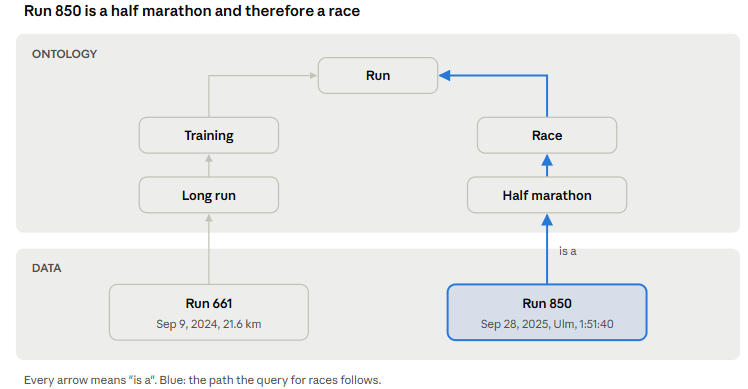
The ontology sits on top, the data below. Run 850 is linked to half marathon, which is a race, which is a run. The question “Which runs are races?” can now be answered by following that path, without storing “race” for every single run.
The notebook builds this graph in DuckDB with the community extension DuckPGQ, which implements SQL/PGQ, the graph part of the SQL standard. Two small tables hold the concepts and their “is a” relationships, a third connects each run to its concept. A property graph exposes these connections, and the query follows them:
FROM GRAPH_TABLE (running_graph
    MATCH (r:runs)-[e:run_is]->(c:concepts)
          -[i:is_a]->{1,3}(s:concepts WHERE s.concept = 'Race')
    COLUMNS (r.run_date, c.concept)
)
ORDER BY run_date;
-- five rows: the half marathons from 2021 to 2025
Add marathon as another kind of race, link a marathon run to it, and the same query includes that run without changes. This is where the relationships between concepts pay off: when you ask questions about actual data.
This remains an experiment. I fill the graph tables explicitly, the Ossie ontology and mapping are not executed to generate them. DuckPGQ is a research project. RDF and SPARQL would be another route, but that is beyond this example.
Conclusion
The ontology clarifies what a half marathon is. The semantic model clarifies how to calculate the pace. Both questions come up in every data project, only there the terms are called customer or contract.
Apache Ossie brings both levels into one open YAML format. The semantic model can already be queried with DuckDB today. The ontology is, for now, readable documentation that a validator can check. My suggestion in the spirit of data.KISS: start with a semantic model for the most important metrics and let the ontology grow as soon as the first terms cause discussions.
The test with real data shows the split from the beginning of this article. Without documented values, both models failed on my words. The ontology fixed the terms but not the calculation, and the semantic model fixed the formula, provided the model could use its interface. This test does not show that an ontology is required. It shows that a schema alone does not tell an LLM which values encode the concepts in a question.
All code runs in one Colab notebook: the data script, the three YAML files, the Turtle file, the graph and the LLM test. Open the notebook in Colab or find it in the GitHub repository.